Shared Account User Attribution
Identify who is using a shared Windows account
Keep the workstation running. Know who is using it.
Credenti associates a verified employee with workstation use while Windows remains signed in under a generic, shared, or service account. An employee taps a badge to establish their operator identity; the next authorized employee can tap over without requiring a separate Windows sign-in.
The operator identity identifies the person using the station. The Windows account continues to run the desktop and its applications.
The shared account tells only part of the story
A production PC might record the same Windows account all day, even as employees change shifts, cover breaks, or move between stations. A front desk may keep a shared workspace open while several colleagues serve guests.
When a question arises later, the shared account name is not enough. Teams need to establish who was attributed to the workstation, when that person took over, and when the next employee arrived. Operator attribution adds those individual boundaries to a workflow that otherwise looks like one continuous account session.
Credenti adds individual operator identification while preserving the shared Windows account and the applications that need to keep running.
How badge tap-in, tap-out, and operator handoff work
Credenti Tap provides badge-based workstation access for this workflow.
Shared account stays active → Employee taps badge → Identity is verified → Operator attribution begins → Access is recorded → Next employee taps over
- Keep the shared Windows session active. Use the designated workstation account for the applications that need to persist. In this access model, changing the operator does not require signing that account out.
- Verify the arriving employee. The employee presents an enrolled badge at a compatible reader. Access is governed by the configured authentication requirements.
- Establish the operator identity. The verified employee becomes the identified operator under the workstation access policy. The operator changes; the underlying Windows account does not.
- Record access for audit review. Identity-bound access records provide context for understanding workstation use. The available session and handoff events determine how precisely each operator’s period of use can be established.
- Tap out or hand over. The departing employee taps out, or the next authorized employee taps in to take over. Tap-out and handoff behavior depends on the shared-account configuration and its interaction with running applications.
Define what changes at handoff and what stays running
Operator handoff is different from Windows user switching
Individual attribution on a shared Windows account
The operator changes. The Windows session stays active.
Windows accountThe designated shared account remains signed in.HandoffThe next verified employee becomes the identified operator.ApplicationsContinue within the shared Windows session.PermissionsThe shared account’s Windows permissions remain in effect.
Individual Windows authentication
Each employee accesses their own Windows session.
Windows accountThe employee signs in under their own identity.HandoffThe active desktop changes to the next employee’s session.ApplicationsRun within each employee’s Windows session.PermissionsEach employee’s account determines their Windows permissions.
Windows user switching can leave another user’s session signed in, but it still changes the active desktop session. Operator tap-over addresses a different requirement: changing the identified person using the same shared session.
Keep applications running while controlling who can use the station
A persistent session and unrestricted access are different things. The desktop may need to stay signed in even when no employee should be able to interact with it.
For a station that must preserve its application, tap-out and inactivity controls need to restrict interactive access while keeping the shared Windows account signed in. The behavior depends on the selected configuration and application: timeouts and screen restrictions can affect continuity.
Authorization matters too. Identifying an employee answers who they are. Workstation access policy determines whether they may use that station. The shared account’s Windows permissions remain in effect, and application-specific restrictions need their own enforcement.
What can an audit record tell you?
Individual attribution helps investigators move beyond a generic account name. Identity-bound access events can provide the employee, workstation, time, authentication method, and policy context needed to review access.
There are three distinct questions:
- Who accessed the workstation? Individual verification and access records provide identity context.
- Who was attributed to it during a particular interval? Session boundaries, handoffs, and unattended periods determine that interpretation.
- Who performed a specific application transaction? This requires suitable application events and a reliable association with the individual operator.
Credenti connects verified operator identity with workstation access records, giving audit reviewers individual context beyond the shared Windows account. Tap-in, handoff, and configured idle-timeout controls help define each operator’s period of access. Where a specific application transaction needs individual attribution, application records provide the additional evidence.
When the application needs its own employee identity
Some organizations need both a persistent desktop and a personal application login. Others must keep the application itself signed in under a shared account. Those are different requirements.
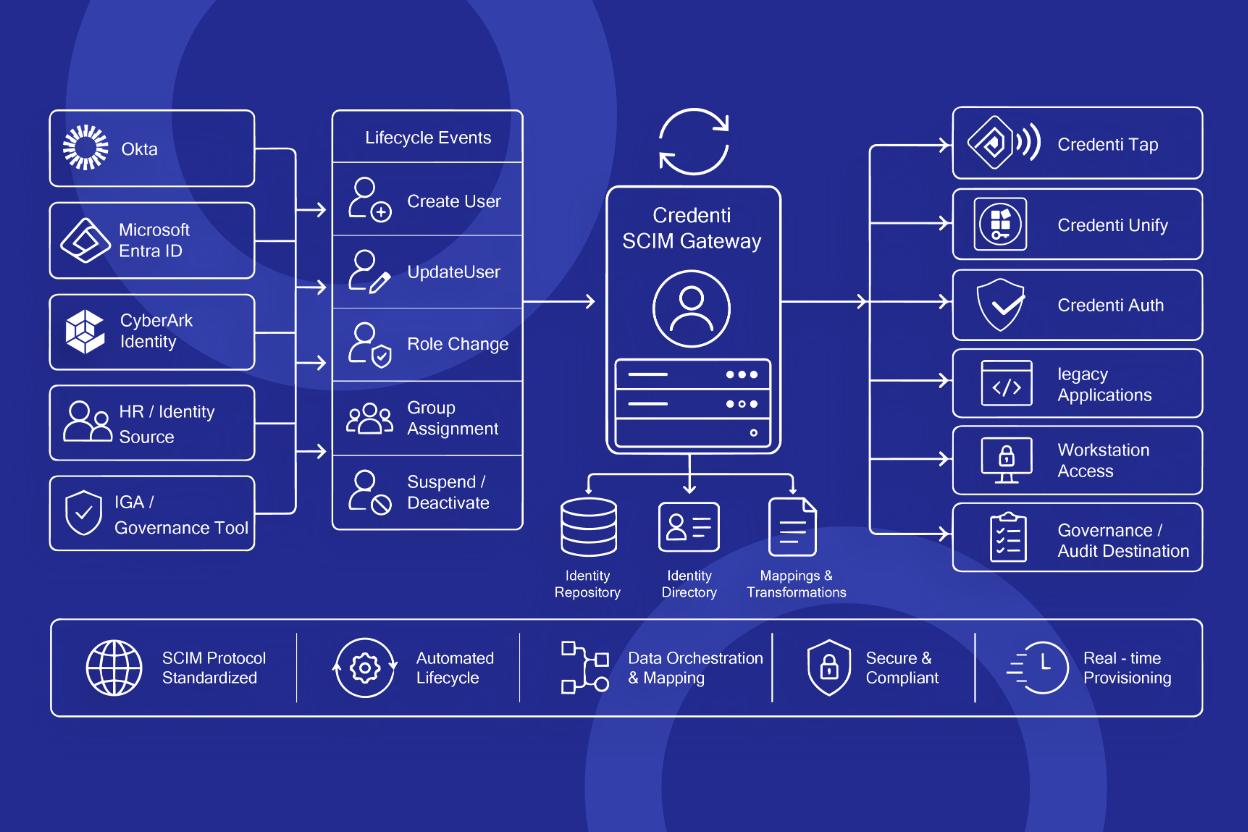
For personal access to supported legacy or thick-client applications, evaluate Credenti Unify alongside Credenti Tap. Application sign-on, removal of the previous employee’s application access, and transaction-level logging must each be addressed. Workstation attribution alone does not establish any of them.
Where this workflow fits
Manufacturing and production workstations
Employees rotate through a station while a production application needs to remain open. Operator identification adds individual accountability at shift changes and shorter handoffs without making a new Windows desktop the required starting point. Explore the wider identity challenges in Manufacturing.
Operational technology and continuously running applications
An industrial workstation may need an application to remain active around the clock while different employees operate it. Operator attribution addresses individual identity within that persistent session. The appropriate access controls depend on how screen restrictions affect process visibility and interaction.
Hospitality and front desk PCs
Colleagues share a front desk workstation throughout a shift. Operator attribution identifies each arriving employee within the shared workspace. Guest-service or payment actions that require personal application identity also depend on the application’s own authentication and logging.
Shared PCs under accountability review
A shared account makes several employees’ workstation use appear under one Windows identity. Operator records add individual context for access reviews and incident investigations, with the scope of activity attribution determined by the available logs.
Police departments and shared operational workstations
Officers and staff may share report-writing PCs, front desk terminals, or dispatch workstations across shifts. Where a shared Windows account must remain active, operator attribution identifies the employee using the station at each handoff and provides individual access context for audit review. Application permissions and activity records remain specific to the systems in use.
Healthcare and exam-room workstations
Physicians move between exam rooms and use the workstation available in each room. Where those PCs retain a shared Windows session, a badge tap identifies the arriving physician without requiring a separate Windows desktop sign-in. The next authorized clinician can tap in to take over. Personal EHR access, patient-context handling, and application-session handoff are separate requirements; workstation attribution alone does not establish them.
Fit operator attribution to your Windows environment
The right configuration depends on the Windows account, the applications that must stay active, and how employees authenticate.
- Windows account and identity source: The Windows integration describes autologon with individual verification before interactive access and documents Active Directory and Microsoft Entra support. Compatibility depends on the workstation join state and shared-account mode; tenant policies can also affect the access flow. Here, “service account” means an existing interactive workstation account, not an unattended background service.
- Badges and readers: Existing-badge compatibility depends on the credential technology, reader, and enrollment requirements. Credenti does not require proprietary authentication hardware; compatible hardware is available through Credenti or your preferred provider. A brand or frequency alone does not establish compatibility.
- Applications and rollout: A pilot on a representative workstation helps establish what stays running during tap-in, tap-out, takeover, and inactivity, where operator attribution ends, and which recorded events support your audit needs.
Do temporary workers need a shared account? A short assignment does not require a shared identity. Use individual Windows and application sessions where they fit; use operator attribution when an operational requirement means the shared session must persist. Every worker still needs a verifiable identity. Rotating a pooled password daily does not identify its users. Review individual Windows access when choosing the session model.
Explore badge access, session controls, and audit resources
- Product — Credenti Tap: Badge-based workstation access and operator handoff capabilities.
- Related product — Credenti Unify: Application sign-on where a separate employee application identity is required; compatibility and handoff behavior need evaluation.
- Integration — Credenti Tap for Windows: Windows account, identity-source, and deployment details.
- Platform — Secure Session Management: Access and inactivity policies for different session models, with behavior dependent on the deployment configuration.
- Platform — Audit Logging: Access and administrative event coverage.
- Related solution — Shared Device Access: The broader range of ways employees can share workstations.
Frequently asked questions
How can we track who used a computer if everyone uses the same login?
Verify employees individually at the workstation and record their operator attribution separately from the shared Windows login. Credenti supports this badge-based access workflow. The resulting record identifies attributed use; determining who performed a particular application action also requires appropriate application evidence.
Does the shared account have to log out when another employee taps in?
No. The purpose of this workflow is to keep the shared Windows session active while the identified operator changes. This requires a shared-account configuration that preserves the Windows session; a policy that signs out an individual Windows session serves a different workflow.
Does every employee need a personal Windows desktop?
No. Each employee needs a verifiable individual identity associated with their credential, but this workflow does not require a separate Windows desktop session for each operator.
What happens if someone forgets to tap out?
Credenti policy automatically secures an unattended workstation after the configured idle timeout, helping protect access when an employee forgets to tap out. The next authorized operator can tap in to take over. In a shared-account workflow, the timeout behavior is configured around the applications that need to remain running.
Can we use the employee badges we already have?
Credenti supports reusing compatible employee badges for workstation access. We can help confirm compatibility with your existing badges and readers, along with any enrollment requirements.
No proprietary Credenti authentication hardware is required. If additional readers are needed, you can purchase compatible hardware through Credenti or your preferred provider.
Can access be limited to particular employees?
Yes. Credenti platform policies let you restrict workstation access to authorized employees, and Credenti Tap can enforce those policies during badge-based access. These controls determine who can use the workstation; the shared Windows account’s permissions and application-specific roles remain separate.
Does this work with Active Directory or Microsoft Entra?
Yes. Credenti Tap integrates with Active Directory and Microsoft Entra to support badge-based Windows workstation access. The shared-account workflow is configured for your workstation setup and identity policies. Application sign-in and session behavior depend on the application and its integration.
How does Credenti establish individual accountability on a shared Windows account?
Credenti ties shared-workstation access to a verified employee identity, providing individual attribution while Windows remains signed in under a generic or service account. This gives audit reviewers evidence of which employee authenticated at the workstation, rather than only the shared account name.
Attributing a specific application transaction requires appropriate application records and a reliable association with the operator. Credenti can help assess the authentication, session controls, and logging needed for your audit requirements.
Discuss your audit and attribution requirements with Credenti.
Keep the shared session. Establish individual accountability.
Tell us which account stays signed in, which applications must keep running, and what you need to know about each employee’s use. Include your workstation and operator counts so the conversation fits your deployment.