
Managed SMS Gateway for Microsoft Entra Authentication
Continue supporting SMS-based MFA for workflows that still require it with a secure, managed External MFA solution — seamlessly integrated with Microsoft Entra and ready to deploy in less than 30 minutes.
The Problem
Starting September 1, 2026, passkeys become the default authentication experience for users enabled for SMS or voice. Starting February 1, 2027, Microsoft-provided telecom delivery for SMS and voice will be retired. For many organizations, this is an opportunity to move more users toward phishing-resistant authentication. However, some environments may still depend on SMS for specific users, applications, operational processes, or regulatory workflows. Organizations that need to preserve those use cases require a secure way to continue SMS-based verification without replacing Microsoft Entra or creating a separate identity platform.
The Solution
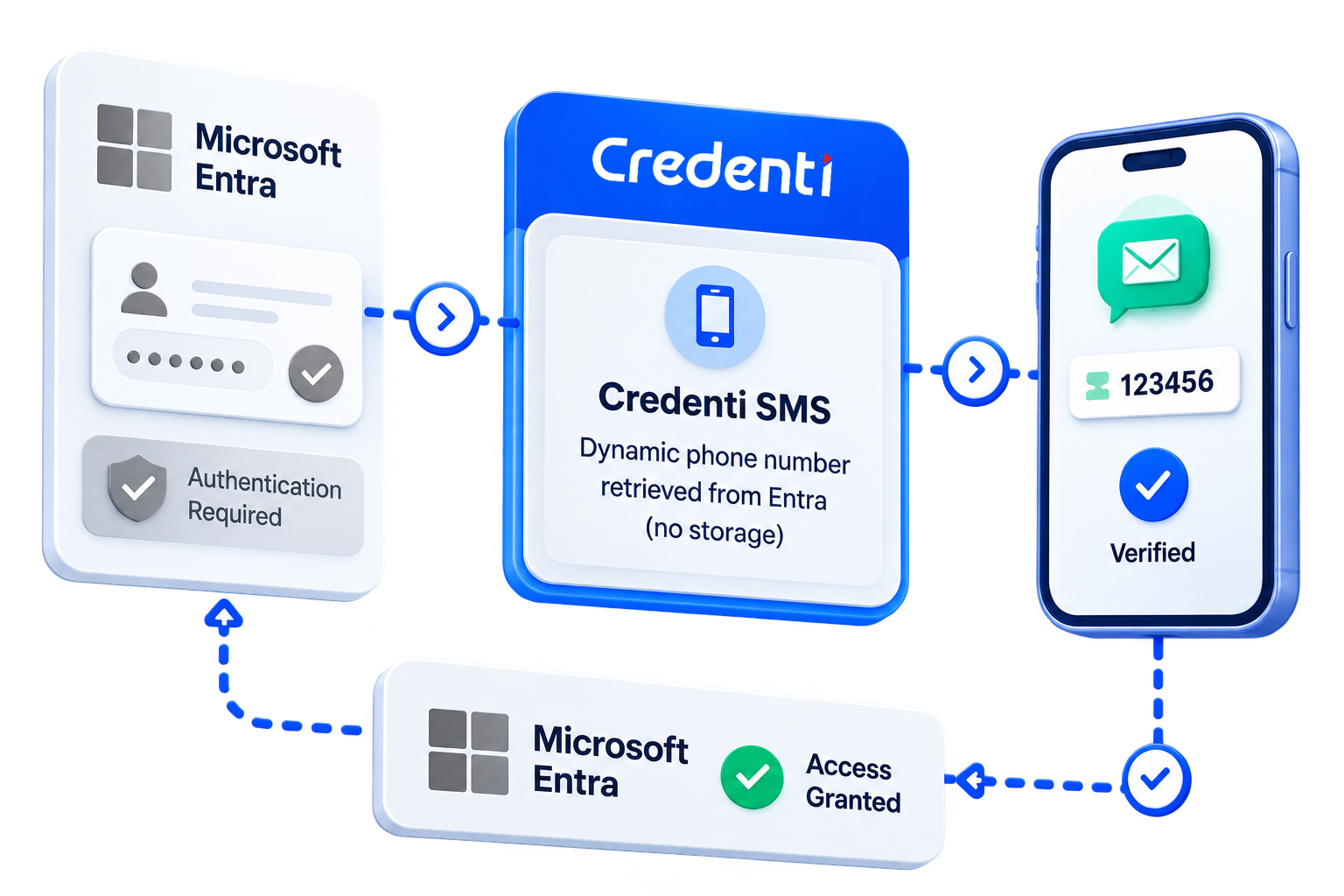

Credenti SMS integrates with Microsoft Entra as an External MFA method. Users continue to authenticate through Microsoft Entra. When additional authentication is required and Credenti SMS is available to the user, they can select it as their MFA method. Microsoft Entra securely redirects the authentication session to Credenti. During the authentication transaction, Credenti dynamically retrieves the user's phone number from Microsoft Entra and sends a time-limited one-time passcode by SMS. The user enters the code with Credenti. After successful verification, Credenti returns the authentication result to Microsoft Entra, which continues evaluating access policies and completes the sign-in. Microsoft Entra remains the identity authority and source of truth for the user's phone number. Credenti handles the SMS verification experience.
Where It Matters
Legacy & Business-Critical Workflows
Continue supporting applications and processes that still depend on SMS verification.
Users Transitioning to Passkeys
Maintain SMS for selected users who cannot immediately move to phishing-resistant authentication.
Regulatory & Operational Requirements
Support defined workflows where telecommunications-based verification remains necessary.
Authentication Modernization
Move most users toward stronger authentication while gradually reducing legacy SMS dependencies.
The Credenti Differentiator
Native External MFA Integration
Credenti participates directly in the Microsoft Entra authentication flow using Microsoft’s External MFA architecture.
Less Than 30-Minute Deployment
Configure and enable Credenti SMS in less than 30 minutes for a fast path to continued SMS authentication.
Entra Remains the Identity Authority
Microsoft Entra continues to control identity, primary authentication, Conditional Access, application access, and authorization decisions.
No Phone Number Storage
Credenti dynamically retrieves the required phone number from Microsoft Entra during authentication without storing it within Credenti.
No Number Synchronization
There is no separate phone directory to populate, synchronize, or maintain within Credenti. Microsoft Entra remains the source of truth.
No Separate SMS Enrollment
Users do not need to register or maintain a second phone number in Credenti for SMS delivery.
Managed SMS Delivery
Credenti manages the SMS verification experience, including OTP generation, delivery, and validation.
Selective Deployment
Keep SMS available for the users and workflows that require it while moving others toward passkeys and phishing-resistant authentication.
How It Works
Frequently Asked Questions
How long does it take to configure Credenti SMS for Microsoft Entra?
Credenti SMS Gateway can typically be configured and enabled in less than 30 minutes.The integration is designed for rapid deployment using Microsoft Entra External MFA and an Entra Enterprise Application, without requiring changes to applications already relying on Entra for authentication.
Does Credenti replace Microsoft Entra?
No. Microsoft Entra remains the identity provider and continues to manage user identities, primary authentication, Conditional Access, applications, and access decisions. Credenti participates only when the external SMS MFA method is selected.
How does Credenti SMS integrate with Microsoft Entra?
Credenti SMS integrates using Microsoft's External MFA architecture and an Entra Enterprise Application. When additional authentication is required, Microsoft Entra redirects the user to Credenti to complete the SMS verification challenge. After successful verification, Credenti securely returns the authentication result to Microsoft Entra.
What does the user experience look like?
The user first authenticates with Microsoft Entra. When MFA is required, the user selects Credenti SMS from the available authentication methods. The user is redirected to Credenti, receives a one-time passcode by SMS, enters the code, and is returned to Microsoft Entra after successful verification.
Does Credenti store user's phone numbers?
No. Credenti does not store user's phone numbers. When a user selects Credenti SMS during authentication, the user's phone number is dynamically retrieved from Microsoft Entra through the authorized integration. Credenti uses the phone number to deliver the SMS one-time passcode for that authentication transaction. The phone number remains managed in Microsoft Entra, eliminating the need to synchronize or maintain phone numbers within Credenti. Microsoft Entra remains the source of truth for the user's phone number.
Do phone numbers need to be synchronized between Entra and Credenti?
No. There is no phone-number synchronization process between Microsoft Entra and Credenti. Credenti dynamically retrieves the user's applicable phone number from Entra when the authentication transaction occurs.
Why would I need Credenti SMS if Microsoft Entra supports passkeys?
Passkeys should be used wherever they are practical and appropriate. Credenti SMS is intended for workflows, user populations, or operational requirements where SMS authentication still needs to remain available. It allows organizations to continue modernizing authentication without forcing every SMS-dependent workflow to change at the same time.
Does the user need to enroll their phone number with Credenti?
No. The user's phone information remains managed in Microsoft Entra. Credenti dynamically retrieves the required phone number during authentication, eliminating a separate Credenti phone-number enrollment process.
Can Credenti SMS be enabled only for selected users?
Yes. Credenti SMS is intended to support controlled deployment so organizations can retain SMS for appropriate users and workflows while using stronger authentication methods elsewhere. The applicable user population can be aligned with the organization's Microsoft Entra authentication andaccess strategy.
Does Credenti control application access?
No. Microsoft Entra continues to control access to applications and evaluates the organization's Conditional Access and authentication policies. Credenti provides the successful SMS verification result required to complete the external MFA step.
Let’s Keep Your SMS Authentication Running Without Disruption
Quickly transition your SMS delivery with no downtime, no coding, and no operational hassle — all while maintaining authentication continuity at scale.


