How organizations can modernize authentication for 5250 environments with passwordless access, stronger identity attribution, and enterprise identity integration without disrupting critical legacy workflows.

AS/400 and IBM i systems continue to power manufacturing, logistics, distribution, banking, insurance, and back-office operations. Yet the authentication experience for many of these environments still centers on 5250 green screen logins built around usernames, passwords, and shared terminal workflows.
That creates a gap between the critical nature of the systems and the way access is controlled. Many organizations want stronger security, better user attribution, and alignment with enterprise identity platforms, but cannot afford to break mature applications or redesign business-critical workflows that have been in place for years.
The most effective path forward is not to rebuild the application. It is to secure the authentication layer around it.
Credenti helps organizations modernize IBM i access by introducing passwordless and phishing-resistant authentication methods before a 5250 session is launched. This allows teams to improve security posture, reduce dependence on passwords, and strengthen auditability while preserving the underlying green screen experience users already rely on.
IBM i systems still run mission-critical operations, but many organizations still secure them with username-and-password green screen access models that no longer align with modern identity expectations.
Modernize authentication without forcing AS/400 application rewrites.
Connect shared terminal access to a real individual identity.
Support badge, face, QR, and mobile-based login experiences.
Integrate access workflows with Okta.
IBM i environments often sit at the center of operational continuity. A green screen application may still drive warehouse execution, manufacturing production records, financial operations, claims processing, inventory visibility, or order fulfillment. Because these systems remain deeply embedded in the business, access patterns are often optimized for speed and familiarity rather than modern identity assurance.
Users access 5250 sessions through legacy terminal workflows that expect a username and password, often on shared machines or stations that support rapid operator turnover.
Traditional MFA methods add interruption, introduce device dependencies, or fail to fit environments where users cannot carry phones or do not have assigned workstations.
As a result, IBM i systems can become identity islands. They remain business-critical, but they are often loosely connected to modern access governance, phishing-resistant authentication strategies, and the enterprise identity standards already enforced elsewhere.
Password-based 5250 access models were built for a different era. In modern environments, they introduce several practical and audit-related risks.
Users still rely on credentials that can be reused, shared, phished, or mishandled in high-volume operational environments.
Shared terminals and inherited sessions make it difficult to prove exactly who accessed a system or performed an action.
Teams often create shortcuts to preserve speed, which can lead to generic accounts, stored credentials, or reduced accountability.
Security teams struggle to extend enterprise MFA policies to IBM i environments in a way that users will actually adopt.
Operations teams want zero disruption to green screen workflows and cannot tolerate repeated login friction on shared terminals.
Audit and compliance teams need stronger evidence of user-level access, not just proof that a terminal reached the application.
Leadership teams want modern identity controls without launching a large legacy modernization project.
Organizations often assume that conventional SSO projects will solve the IBM i problem. In practice, green screen systems rarely fit neatly into modern browser-centric SSO assumptions. Even when integration is technically possible, it may be difficult to deploy, limited in user experience, or poorly suited for shared and operational terminals.
That is because the real challenge is not simply federation. It is how to establish trusted user identity at the point of access in a way that works for operational users, preserves session speed, and fits an application model designed long before modern SSO conventions became standard.
For many AS/400 environments, success depends on modernizing access control around the session rather than trying to force the green screen into a browser-first authentication model.
Credenti secures the authentication layer around IBM i access without requiring organizations to change the way the green screen application itself works. Instead of rebuilding the business system, teams introduce stronger identity verification before the user reaches the 5250 session.
Use modern authentication methods to verify the individual before launching or resuming access to the AS/400 environment.
Keep the existing IBM i workflow intact so users can continue operating within the familiar green screen environment.
Enable badge-based login experiences on shared workstations and operational terminals where speed and simplicity are critical.
Allow users to authenticate to the machine with face biometrics, creating a fast and user-friendly passwordless experience.
Bridge modern identity platforms and legacy access flows so organizations can align IBM i access with broader identity strategy.
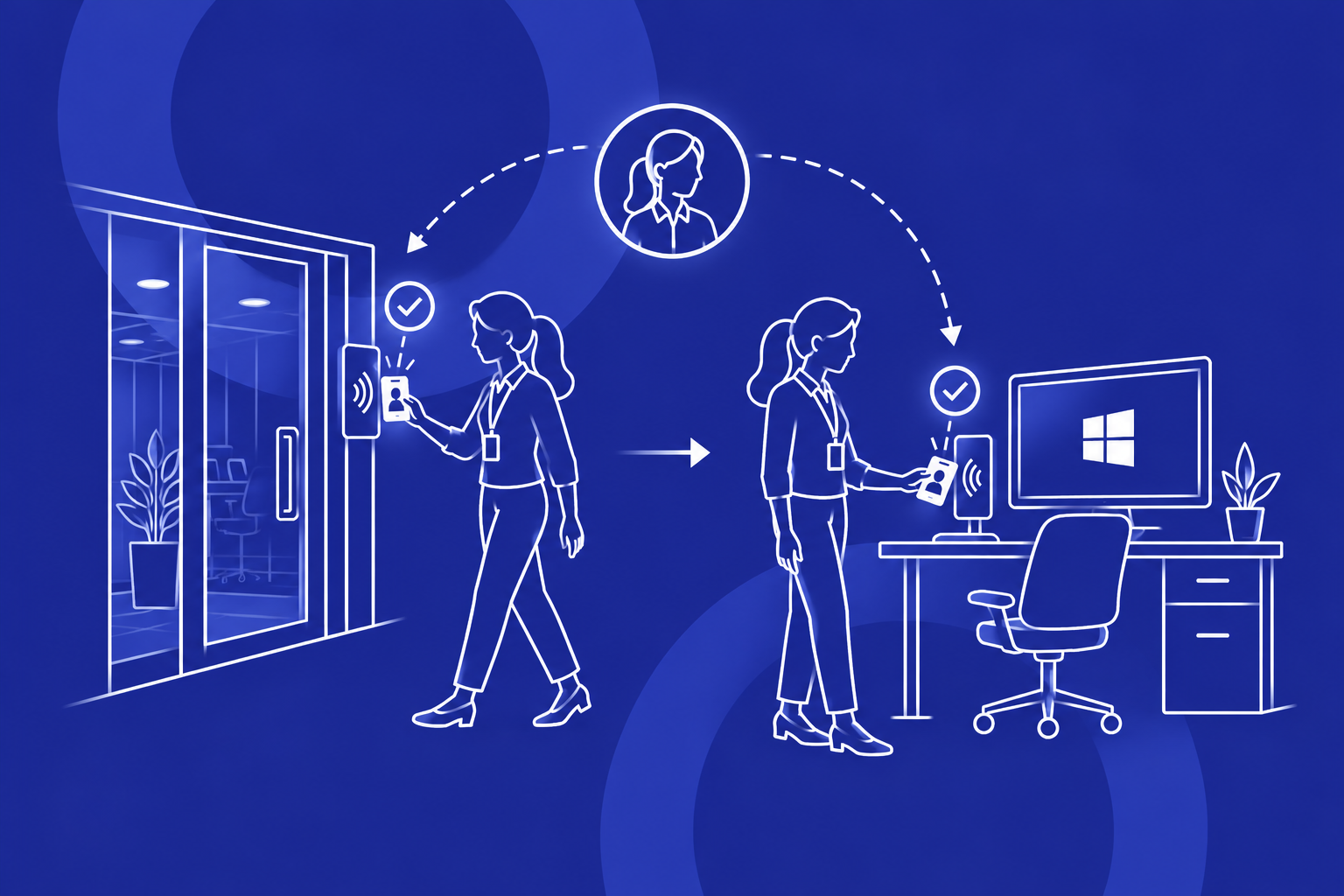
The model below illustrates the conceptual flow. The user first establishes identity through a Credenti authentication method. That access decision can align with the organization’s enterprise identity strategy, and then the user is granted access to the IBM i session without changing the green screen application logic.

IBM i security modernization should not depend on a single access pattern. Different environments need different ways to establish identity while preserving usability.
Well suited for shared terminals, operational workstations, and environments where users need rapid access without typing credentials.
Delivers a fast passwordless experience directly at the machine, helping reduce friction while strengthening individual attribution.
Provides an additional option for environments that can support device-mediated identity proofing without relying on passwords.
One of the hardest IBM i problems is the shared terminal problem. Warehouses, manufacturing floors, dispatch areas, counters, and back-office operations often use devices that many individuals touch throughout the day. Logging in and out with a traditional password prompt each time creates friction, so teams naturally look for shortcuts.
Credenti is designed to secure that model without forcing teams to abandon it. Users can prove identity quickly at the point of use, access the machine, and continue into the green screen workflow they already know. This helps preserve speed while restoring accountability.
The goal is not to slow down shared terminal operations. The goal is to make them attributable, more secure, and easier to govern.
Many IBM i use cases sit close to operations where continuity matters more than perfect network conditions. Organizations may need a solution that continues to support user authentication even when connectivity is degraded, unreliable, or intentionally restricted.
That matters in plants, distribution sites, remote operations, transportation environments, and other scenarios where critical work cannot stop because a cloud dependency is temporarily unavailable. Credenti’s broader platform positioning supports strong access workflows in environments where business continuity and offline resilience are important design requirements.
Modernizing access to AS/400 and IBM i systems helps organizations support broader security and governance objectives. While requirements differ by industry, the common themes are consistent: reduce password exposure, strengthen user-level attribution, improve access control evidence, and better align legacy systems with enterprise identity expectations.
Reduce dependence on weak or shared credentials in critical operational environments.
Improve the ability to tie access events and workflow initiation to a specific, verified user identity.
These outcomes can support internal control initiatives as well as broader alignment with frameworks and expectations around access assurance, operational accountability, and legacy system risk reduction.
Secure production-floor terminals connected to IBM i applications without disrupting high-speed operational workflows.
Improve identity assurance at warehouse and fulfillment stations that rely on shared access to 5250-based systems.
Strengthen authentication for legacy transaction and processing systems while preserving familiar operator experiences.
Organizations do not need to choose between keeping IBM i systems and improving authentication. They can preserve the application, preserve the workflow, and still implement a stronger, more modern identity layer around access.
Once organizations modernize the authentication experience for shared terminals and workstations, the next step is extending those identity controls to the IBM i systems themselves. Many environments running IBM i (AS/400) and iSeries systems rely on 5250 terminal applications that were never designed for modern federation standards such as SAML or OIDC.
These systems often run on IBM Power Systems infrastructure and support mission‑critical workloads across manufacturing, logistics, banking, and insurance operations. Replacing these applications is rarely practical, which means security improvements must occur around the access workflow rather than inside the application itself.
Credenti enables SSO for IBM i environments by verifying user identity before the terminal session begins. After authenticating through enterprise identity providers such as Okta, users can launch or resume their AS/400 sessions without manually entering passwords. This allows organizations to introduce AS400 MFA, passwordless authentication, and stronger identity attribution while preserving the familiar green‑screen workflow operators depend on.
Modernizing authentication is only one part of securing legacy platforms. Organizations also need consistent identity governance and lifecycle management across all systems, including IBM i environments.
Credenti supports this through an IBM AS/400 Connector that integrates IBM i systems with enterprise identity platforms such as Okta. This allows organizations to manage the entire identity lifecycle—from account creation to de‑provisioning—while maintaining visibility into user access and activity within IBM i systems.
Aggregate governance data from IBM i systems to support compliance analysis, access reviews, and detection of rogue or unauthorized accounts.
Provide visibility into user activity within AS/400 environments, strengthening auditability and supporting regulatory and internal security controls.
Create new user accounts in IBM i automatically when identities are onboarded through the enterprise identity platform.
Synchronize role changes, profile updates, and identity attributes between the identity provider and IBM i accounts.
Automatically deactivate or remove IBM i accounts when users leave the organization or no longer require access.
The connector operates through the Credenti SCIM Provisioning Gateway, a SOC 2 Type II audited service running in Amazon Web Services (AWS). This enables secure identity synchronization and lifecycle governance for IBM i / AS400 environments while maintaining enterprise‑grade reliability and compliance controls.
To operationalize identity governance at scale, organizations increasingly rely on the System for Cross-domain Identity Management (SCIM) standard. Credenti extends SCIM-based lifecycle automation to IBM i (AS/400) and iSeries environments, which typically lack native support for modern provisioning protocols.
Using the Credenti SCIM Provisioning Gateway, identities from platforms such as Okta can be synchronized directly into IBM i systems. This allows IT teams to automate provisioning, updates, and de-provisioning of user accounts while maintaining consistent identity policies across both modern and legacy systems.
Create IBM i user profiles automatically when employees are onboarded and assigned access in the enterprise identity platform.
Synchronize profile attributes, entitlement changes, and role updates between Okta and IBM i environments.
Disable or remove AS/400 user profiles immediately when a user leaves the organization, reducing orphaned accounts and compliance risk.
This architecture aligns IBM i systems running on IBM Power Systems with modern identity lifecycle management practices, ensuring that legacy platforms participate fully in enterprise identity governance strategies.
The lifecycle flow below shows how a provisioning event can originate in the identity provider, be processed through Credenti, and then be applied to IBM i in a format the platform can natively execute. This is the key architectural pattern that allows IBM i to participate in modern joiner, mover, and leaver workflows without requiring native SCIM support on the AS/400 side.

A joiner, mover, or leaver event in Okta typically results in an application assignment change, which in turn generates a SCIM provisioning transaction for the IBM i-connected application.
The on-prem IBM AS/400 Connector maps SCIM attributes and lifecycle actions to IBM i-native user profile operations so the target platform can process them without native SCIM support.
In practical terms, this means a user can be created in Okta, assigned access to the IBM i-connected application, and then provisioned automatically into IBM i / AS400. Later changes such as attribute updates, access changes, suspension, or termination can follow the same lifecycle path with consistent auditability.
Yes. Credenti enables SSO for IBM i (AS/400) environments by automating authentication into 5250 terminal sessions while integrating with enterprise identity providers such as Okta. Users can access AS/400 systems without manually entering passwords while still preserving the existing application workflow.
Yes. Credenti allows organizations to enforce MFA for AS400 and IBM i systems by applying authentication policies defined in the identity provider before granting access to the 5250 terminal session.
Yes. Credenti enables Okta integration with IBM i environments and can extend identity verification from modern identity providers to legacy terminal-based systems that do not natively support federation protocols.
Yes. Credenti supports SSO for IBM iSeries and AS/400 systems, allowing users to authenticate with passwordless methods while maintaining compatibility with traditional green screen applications.
Yes. Organizations can introduce modern SSO concepts around AS/400 access by securing the authentication and session initiation workflow instead of trying to redesign the green screen application itself. This makes it possible to align access with broader identity strategy while preserving the existing business system.
The most practical model is to modernize the authentication layer before the user reaches the 5250 session. That allows an organization to enforce stronger identity verification, reduce reliance on passwords, and improve attribution without changing how the IBM i application behaves once the session begins.
Yes. Shared environments can use badge, biometric, QR, or mobile-assisted login workflows to establish the user’s identity quickly at the machine. This preserves the speed operational teams need while making access more attributable and reducing unsafe shortcuts.
No. Many organizations keep the IBM i application exactly as it is and modernize only the access workflow around it. This lowers disruption, shortens deployment complexity, and allows identity improvements to happen independently of a full legacy modernization project.
Credenti helps organizations verify the individual before access to the AS/400 environment is established. With options such as Credenti Tap for badge-based access, Credenti You for face biometric login, and Credenti Unify for bridging legacy and modern identity workflows, organizations can strengthen security while preserving operational usability.
Yes. Through the IBM AS/400 Connector and the Credenti SCIM Provisioning Gateway, organizations can automate provisioning of IBM i accounts when new users are onboarded in identity platforms such as Okta. This ensures user accounts are created consistently and reduces manual administration.
Credenti integrates IBM i systems with enterprise identity platforms so that the full identity lifecycle can be managed centrally. When a user’s role changes or they leave the organization, updates and de‑provisioning actions can automatically propagate to AS/400 accounts, reducing orphaned accounts and improving security posture.
Yes. Credenti aggregates identity and access information from IBM i environments so organizations can include AS/400 accounts in broader identity governance processes such as access reviews, compliance analysis, and detection of rogue or inactive accounts.
Yes. Using the Credenti SCIM Provisioning Gateway, organizations can implement SCIM-based provisioning for IBM i systems. This allows identity platforms like Okta to automatically create, update, and disable AS/400 accounts while maintaining consistent identity policies across modern and legacy applications.
Secure green screen access with passwordless authentication, stronger identity attribution, and enterprise identity alignment without forcing users to abandon the workflows that keep operations moving.