
Legacy Application Governance
Organizations rely on legacy on-prem applications like ERP, MES, EHR, case management, and financial systems (Fiserv, Bloomberg), but these systems lack modern identity governance. This creates gaps in auditability, access reviews, and lifecycle enforcement, often requiring manual processes and inconsistent tracking.
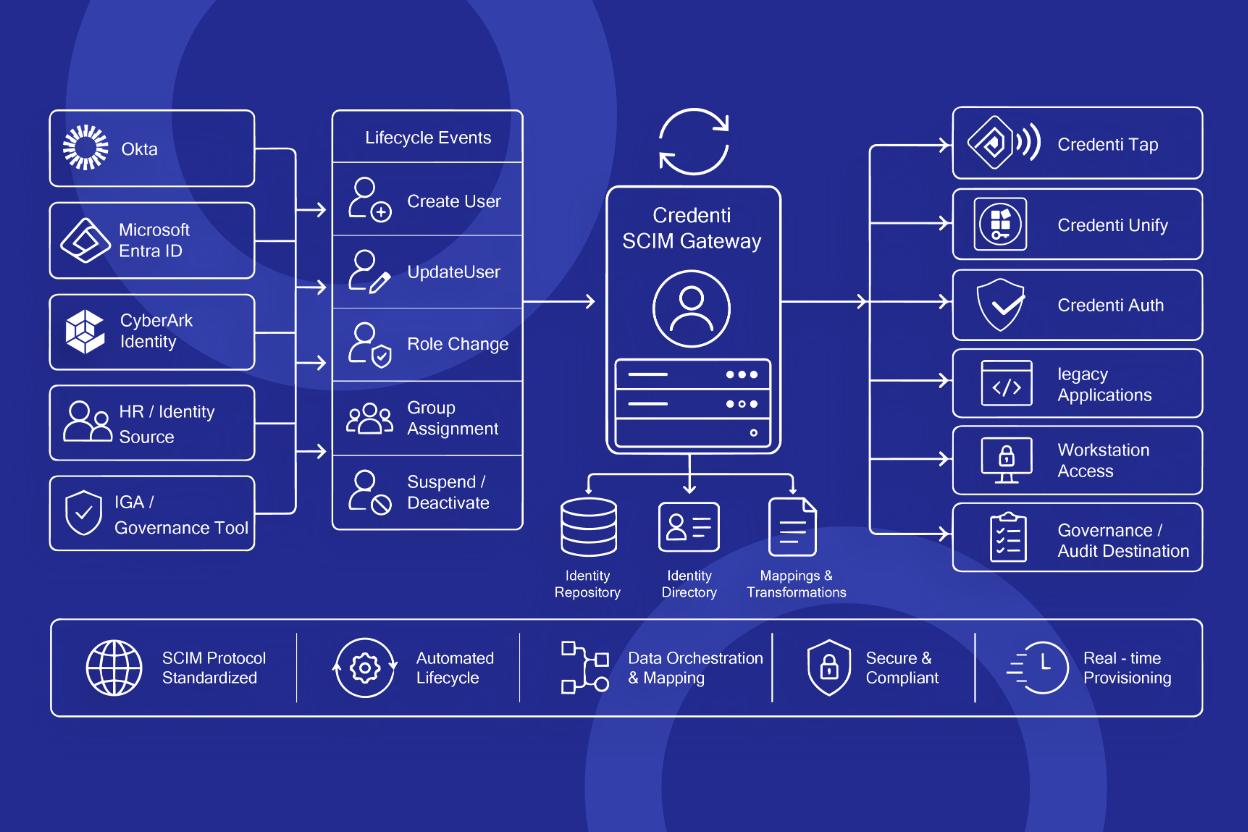
This white paper outlines how Credenti Unify, integrated with Okta, Microsoft Entra, CyberArk, and OIDC-compatible identity providers, brings identity enforcement and governance to legacy applications without requiring application changes.
The approach enables:
- Detection of inactive users (e.g., 30/60/90 days)
- Manager-based access reviews and approvals
- Identity-linked audit trails for every session
- Automated access removal with audit evidence
It also addresses critical enterprise requirements such as audit-ready access controls, individual accountability, and consistent governance across on-prem and non-federated systems.
Download the white paper to learn how to automate legacy application governance and improve audit readiness without disrupting existing workflows.
Download Whitepaper
Frequently Asked Questions
What is legacy application governance?
Legacy application governance is the ability to apply modern identity controls—such as access reviews, inactivity-based deprovisioning, and audit reporting—to applications that do not support SAML/OIDC/SCIM.
How does Credenti Unify add auditability to non-federated applications?
Credenti Unify enforces user authentication before access and captures session telemetry (identity, timestamps, device, authentication method). This creates per-user attribution and exportable evidence for audit.
Can Credenti Unify automate access removal for inactive users?
Yes. You can define inactivity policies (e.g., 30 days) that generate reports, notify managers, capture approvals, and remove access with logged enforcement events.
Which identity providers does Credenti Unify integrate with?
Credenti Unify integrates with Okta, Microsoft Entra, CyberArk, and other identity providers that support OIDC (OpenID Connect) for policy validation and enterprise identity alignment.
Does Credenti Unify require changes to the underlying application?
No. Credenti Unify adds identity enforcement and governance capabilities without modifying the legacy application.

Ready to Identify Dormant Access?
Run a quick evaluation of your legacy application access patterns and identify users inactive for 30+ days.


