
Identity Accountability in Detention Centers

Fast, secure workstation login for correctional officers so inmate documentation, incident reports, and access to sensitive records are attributed to the correct officer without disrupting shared workstation workflows.

Executive Summary

Detention facilities rely on digital systems to manage inmate records, incident reporting, evidence documentation, and operational workflows. Yet many facilities still depend on shared workstation logins or generic kiosk sessions to preserve speed.

This creates a critical gap: actions inside jail management systems may not be reliably tied to a verified officer identity. The outcome is misattribution, weak audit trails, and increased legal and operational risk.

Shared credentials and generic workstation accounts can also introduce CJIS accountability gaps. CJIS-aligned environments require traceability of user activity, including the ability to identify which individual accessed criminal justice information and performed specific actions within a system. When multiple officers operate under the same account, that traceability is lost.

This paper outlines a practical approach to restore identity accountability while preserving operational speed, enabling detention facilities to strengthen officer attribution, improve audit trails, and close identity-related compliance gaps.

Key takeaways

  • Shared logins break attribution: inmate documentation and incident reports may be tied to a generic account instead of the officer who performed the action.
  • Speed matters in secure zones: detention center posts require fast access without repeated password entry or disruptive logout cycles.
  • Identity-based workstation access restores accountability: officers can authenticate quickly at shared terminals so records and actions map to the correct officer.
  • Audit clarity improves investigations: stronger traceability supports internal reviews, compliance needs, and defensibility of records.

The Identity Problem Inside Modern Detention Facilities

Correctional environments involve rotating shifts, shared computers, and constant movement between posts.

  • Booking desks
  • Housing unit terminals
  • Control rooms
  • Medical documentation stations
  • Evidence processing terminals

To maintain speed, many facilities rely on shared logins or generic workstation accounts.

The Risk: When Officer Identity Is Lost

Incorrect Report Attribution

Incident reports and inmate documentation may be logged under generic accounts.

Chain of Custody Concerns

Evidence documentation requires reliable identity attribution.

Legal Exposure

Misattributed documentation can complicate investigations and legal proceedings.

Audit Challenges

Shared credentials make it difficult to reconstruct who accessed systems.

Why Traditional Login Methods Fail in Detention Centers

  • Passwords are slow and frequently shared.
  • Mobile MFA apps cannot be used in restricted zones.
  • Hardware tokens are easily misplaced.
  • Frequent login cycles interrupt active applications.

The Ideal Authentication Model for Correctional Environments

  • Rapid officer authentication
  • Instant session switching
  • Identity-based audit logging
  • Support for shared workstation environments

Restoring Identity Accountability with Credenti

Badge Tap Login

Officers authenticate instantly using their existing facility badge.

QR Code Login

Officers can scan a secure QR code displayed on the workstation to quickly identify themselves, enabling fast authentication in shared workstation environments without entering credentials.

Face Authentication

Where cameras are available, officers can authenticate using biometrics.

Instant Session Switching

Officers moving between posts can quickly assume control of a workstation.

Identity Based Audit Logging

All system activity is tied to an officer identity.

Supported Authentication Methods

Credenti provides multiple authentication options designed for correctional environments where speed, simplicity, and security are critical. Facilities can deploy one or more methods depending on operational requirements and workstation configuration.

  • 🎫Badge Tap Login (RFID / CAC / PIV‑I): Officers tap their existing facility badge on a reader to instantly authenticate at the workstation.
  • 📱QR Code Login: Officers scan a secure QR code displayed on the workstation to quickly identify themselves without entering usernames or passwords.
  • 🧑‍💻Face Authentication: Where cameras are available, officers can authenticate using biometric face recognition for fast, hands‑free login.
  • 📶Mobile Proximity Login: Authorized officers can authenticate using the Credenti mobile app when mobile devices are permitted within the facility.

These authentication methods can be used individually or in combination, allowing detention facilities to deploy the most appropriate login model for booking desks, housing pods, control rooms, and other shared workstation environments.

Credenti Architecture Overview

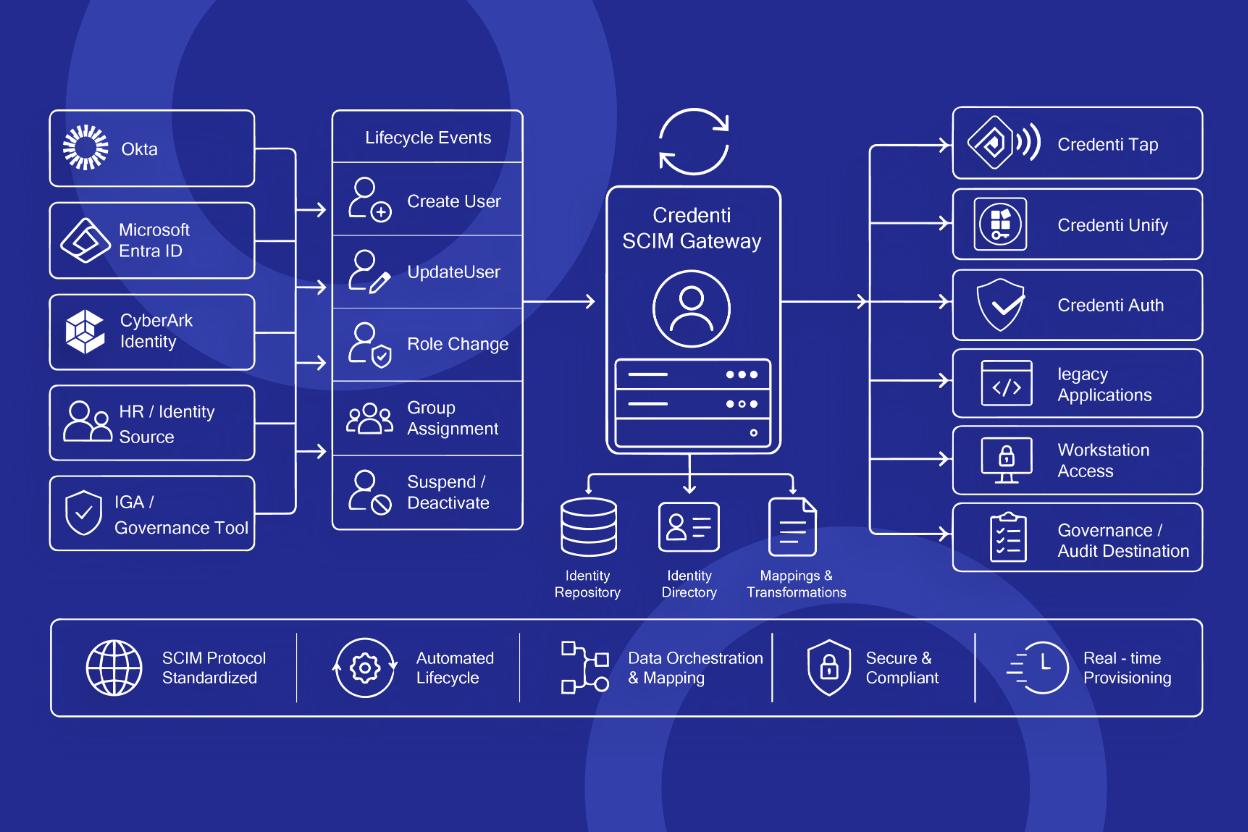
The Credenti platform integrates with existing identity infrastructure to enable fast officer authentication at shared detention center workstations while maintaining identity attribution and auditability.

  • Officer authentication using badge tap, QR code login, or biometric authentication at the workstation
  • Credenti workstation agent verifies the officer identity locally
  • Identity provider integration with platforms such as Okta or Microsoft Entra for centralized identity governance
  • Access to jail management systems continues without disrupting existing applications
  • All actions are logged under the verified officer identity for audit and accountability

Conceptual architecture flow:

Officer → Credenti Authentication → Credenti Workstation Agent → Identity Provider (Okta / Entra) → Jail Management System

This architecture allows detention facilities to preserve operational speed while ensuring that all system activity is tied to the correct officer identity.

Officer Identity Attribution Workflow

The diagram below illustrates how Credenti restores officer-level identity attribution at shared detention center workstations without interrupting existing applications.

  • Officer authenticates using badge tap or biometric authentication
  • Credenti verifies the officer identity at the workstation
  • Access to jail management or reporting systems continues without requiring application restarts
  • All actions are logged under the officer's verified identity

Example flow:

Officer → Badge Tap / QR Login / Face Authentication → Workstation → Jail Management System → Identity‑Attributed Report

This model preserves the speed required in correctional environments while ensuring every incident report, inmate record update, and system action is tied to the correct officer identity.

Example Workflow: Incident Reporting

Traditional Workflow

  1. Officer uses shared workstation login
  2. Files incident report
  3. System records generic identity

Identity Based Workflow

  1. Officer taps badge
  2. Workstation identifies officer
  3. Report is logged under that officer

Deployment Across the Facility

  • Intake and booking
  • Housing pods
  • Medical documentation stations
  • Control room terminals
  • Evidence documentation stations

Security and Compliance Alignment

Identity-based workstation authentication improves traceability and supports a stronger audit posture in justice environments. By ensuring that every workstation session is tied to a verified officer identity, detention facilities gain clear visibility into who accessed systems and performed specific actions.

This approach helps address accountability expectations commonly associated with the CJIS Security Policy, which emphasizes user identification, individual accountability, and the ability to audit access to criminal justice information (CJI). When shared or generic accounts are used, that accountability is difficult to maintain.

By enabling officers to quickly authenticate at shared workstations while maintaining individual attribution, facilities can strengthen identity traceability, improve audit readiness, and reduce the operational risks created by shared credentials.

Operational Benefits

  • Improved officer accountability
  • Faster workstation access
  • Reduced password sharing
  • Stronger audit trails

Conclusion

Detention centers should not have to choose between operational speed and identity accountability. Modern authentication allows facilities to achieve both.

Who this white paper is for

  • County detention centers and correctional facilities
  • Sheriff's offices managing jail operations
  • Corrections IT and security teams responsible for shared workstations
  • Justice system administrators focused on CJIS accountability and audit readiness

Restore officer-level accountability at shared detention center workstations

Credenti enables fast badge, QR code, or biometric login so every inmate report, incident record, and system action is tied to the correct officer identity—without slowing operations or disrupting existing applications.

  • Designed for shared jail workstations used in booking desks, housing pods, control rooms, and evidence stations
  • No phones or hardware tokens required — officers can authenticate using existing badges or biometrics
  • Supports operational continuity with authentication that can function even when network connectivity is limited
FAQs

Frequently Asked Questions

How does Credenti ensure inmate reports and documentation are attributed to the correct officer?

Credenti enables correctional officers to quickly authenticate at shared workstations using badge tap or biometric authentication. Once the officer authenticates, all system actions and documentation are tied to that officer's identity, ensuring incident reports, inmate records, and other activity are accurately attributed.

How does Credenti work with shared workstations used by multiple officers during a shift?

Credenti is designed specifically for shared workstation environments. Officers can quickly identify themselves at a terminal without disrupting running applications, allowing the workstation to remain operational while ensuring that each officer's activity is recorded under their identity.

Do correctional officers need phones or security tokens to authenticate with Credenti?

No. Credenti supports authentication methods appropriate for secure correctional facilities where personal devices are restricted. Officers can authenticate using their existing ID badges or biometric authentication directly at the workstation.

Can Credenti continue to work if the network connection is unavailable?

Yes. Credenti supports offline authentication capabilities so officers can continue accessing shared workstations and documenting activity even when network connectivity is temporarily unavailable.

How does Credenti improve accountability and audit trails in correctional facilities?

Credenti ensures that every workstation session and system interaction is tied to a verified officer identity. This creates clear audit trails for incident reports, inmate documentation, and system access, helping detention facilities reconstruct events, support investigations, and strengthen operational accountability.
Secure officer login in seconds

Give correctional officers fast badge, QR, or biometric login at shared detention center workstations while ensuring every inmate record and incident report is tied to the correct officer.